Help customers find a domain they want to build on.
Turn a business idea into a practical shortlist. Bring naming suggestions, availability checks, saved domains, comparison and WHMCS cart handoff into one discovery experience shaped around your brand and the extensions you sell.
Look closer. See what you can do.
Look inside the product, explore its capabilities and see how the work comes together.
Start with the search service at a glance
See configuration progress, search activity, customer actions and provider health from the module’s administrator workspace.
Explore this capabilityA useful journey from brief to domain.
Give the visitor more than a blank search box. The finder starts with the idea, develops several naming directions and keeps useful choices close as the customer narrows the search. Availability, pricing and cart handoff turn that discovery into a practical next step.
Understand the idea
Use the business brief, preferred style, words and market to shape the search.
Develop naming directions
Combine built-in generation and optional AI with length, diversity and extension choices.
Refine the shortlist
Let visitors respond to names, explore similar options, save favorites and compare.
Connect the purchase
Bring lookup results, registration pricing and selected names into the WHMCS cart.
Match your website
Choose launcher or inline placement, branding, wording and approved website embeds.
Learn and follow up
Review searches and provider use, then remind eligible customers about saved names.
Give every idea more than one direction
Some customers want a short brand name. Others want a clear description, a local identity or a name that keeps a particular word. AI Domain Finder gives those different goals their own starting points, then builds and ranks a varied set of candidates.
The built-in generator can work alongside your configured AI providers, with controls for length, words, extension choice and diversity. Customers can explore a direction without repeatedly seeing small variations of the same name. The different modes make it easier to explore a name that matches the customer's idea, audience and preferred style.
- Business brief
- Naming style
- Varied candidates
- Relevant extensions
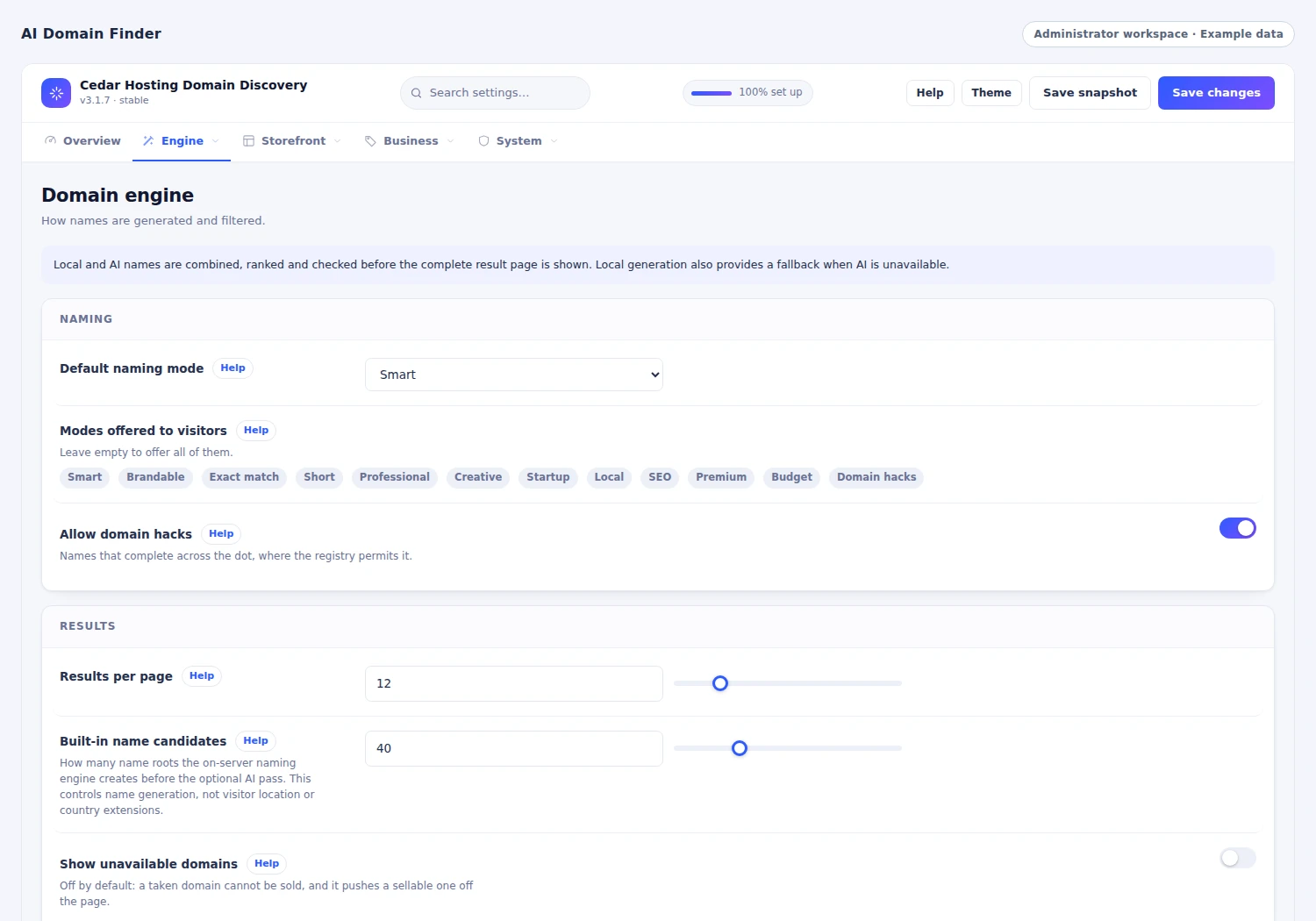
 Guide which extensions enter a search
Let the customer shape the search
A naming journey rarely ends with the first result. Visitors can like a candidate, reject a direction, ask for more like a promising name and refine what they want. Saved domains and comparison keep useful options close while they continue exploring.
Session preferences can influence the next set of suggestions, while earlier results help the finder avoid repetition. This gives customers a way to move from a broad idea toward a choice they can explain. Each interaction contributes to a more focused shortlist, keeping the customer's useful discoveries close while they explore the next direction.
- Like a direction
- More like this
- Save useful names
- Compare the options
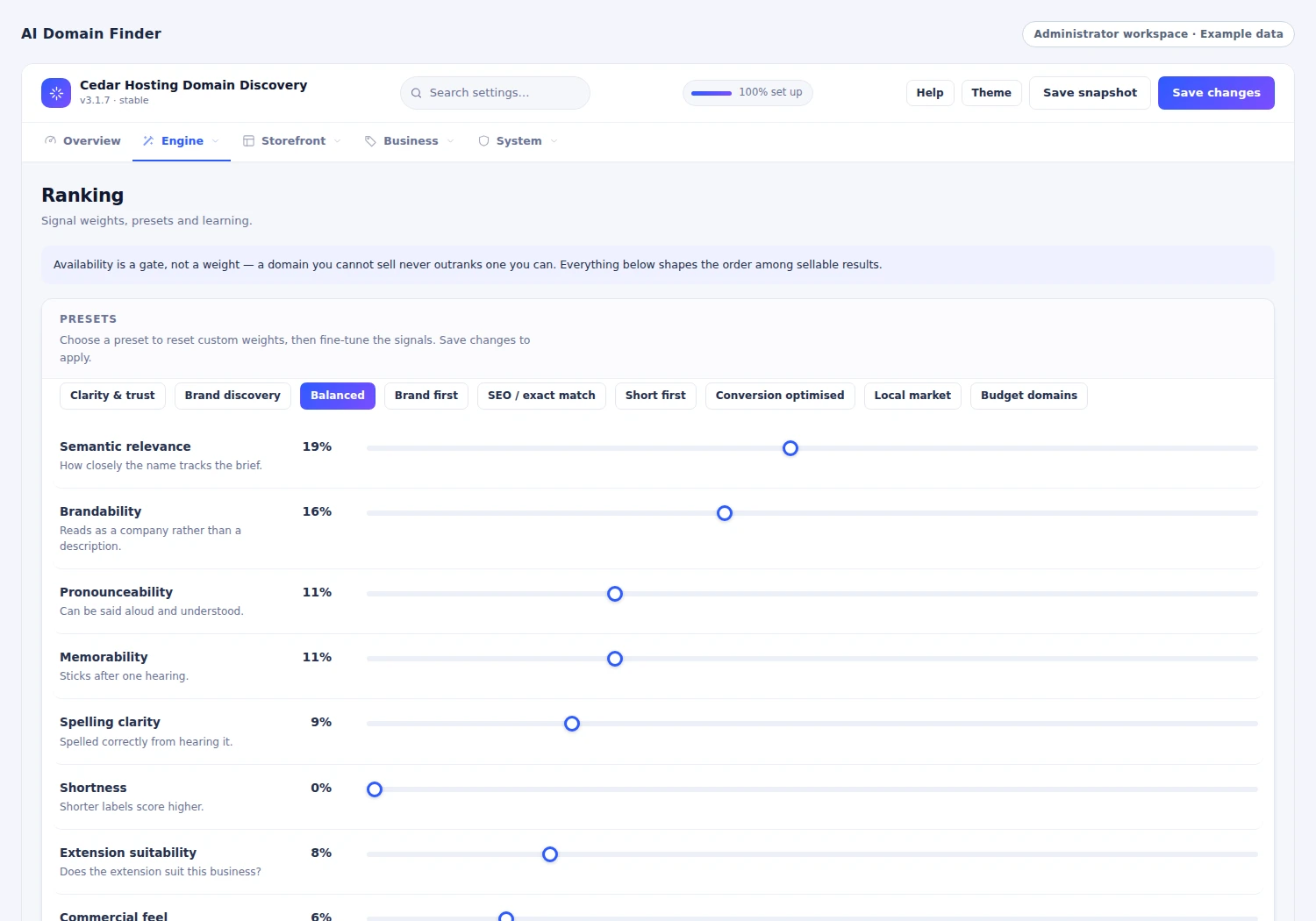
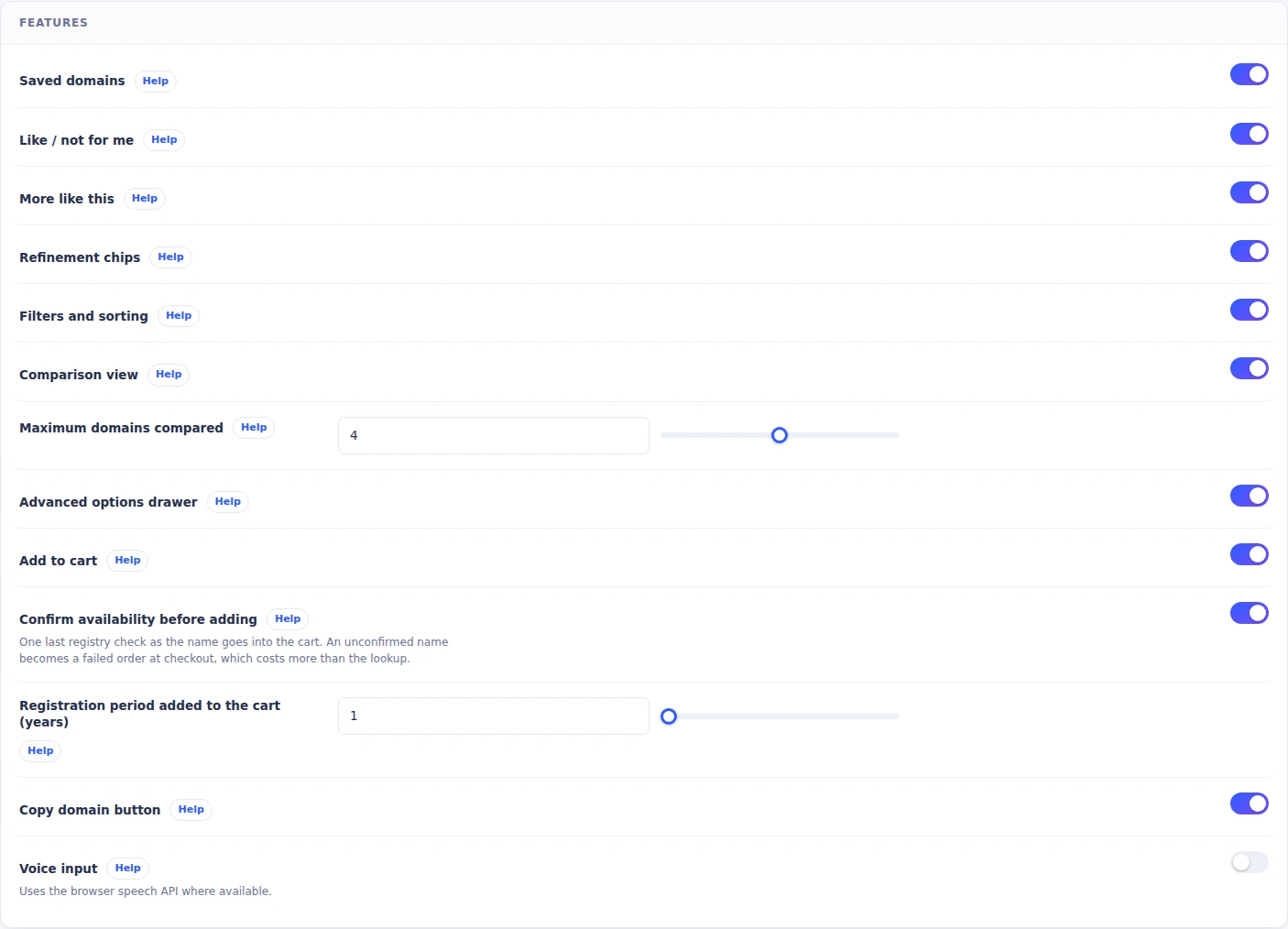 Choose the tools available beside a domain result
Check names through your domain lookup setup
Connect naming ideas to the domains your business can offer. The finder routes availability checks through your configured sources, including supported registrar lookup and WHMCS lookup paths, then uses the result to shape the customer's buying options.
Administrators can choose lookup sources, tune caching and enable a fresh check when the customer continues to the cart. That brings discovery and availability into the same journey. Customers can explore a name, see the available buying information and take the next step from the result they selected, while your team controls the lookup setup behind the experience.
- Configured lookup
- Relevant extension
- Available choice
- Buying information
Bring the shortlist into WHMCS
The selection experience leads to the same WHMCS cart your customers already use. A visitor can choose names from the finder and continue to checkout while keeping other cart items in place.
Domain prices are drawn from the shop's configured registration pricing and resolved currency. Availability-confirmation controls can recheck the selected names during the handoff. Customers move from comparing possibilities to reviewing a real order with their chosen names in place. The finder supports the discovery work, and the familiar cart carries the next part of the purchase.
- Select the names
- Check the price
- Confirm availability
- Continue to WHMCS

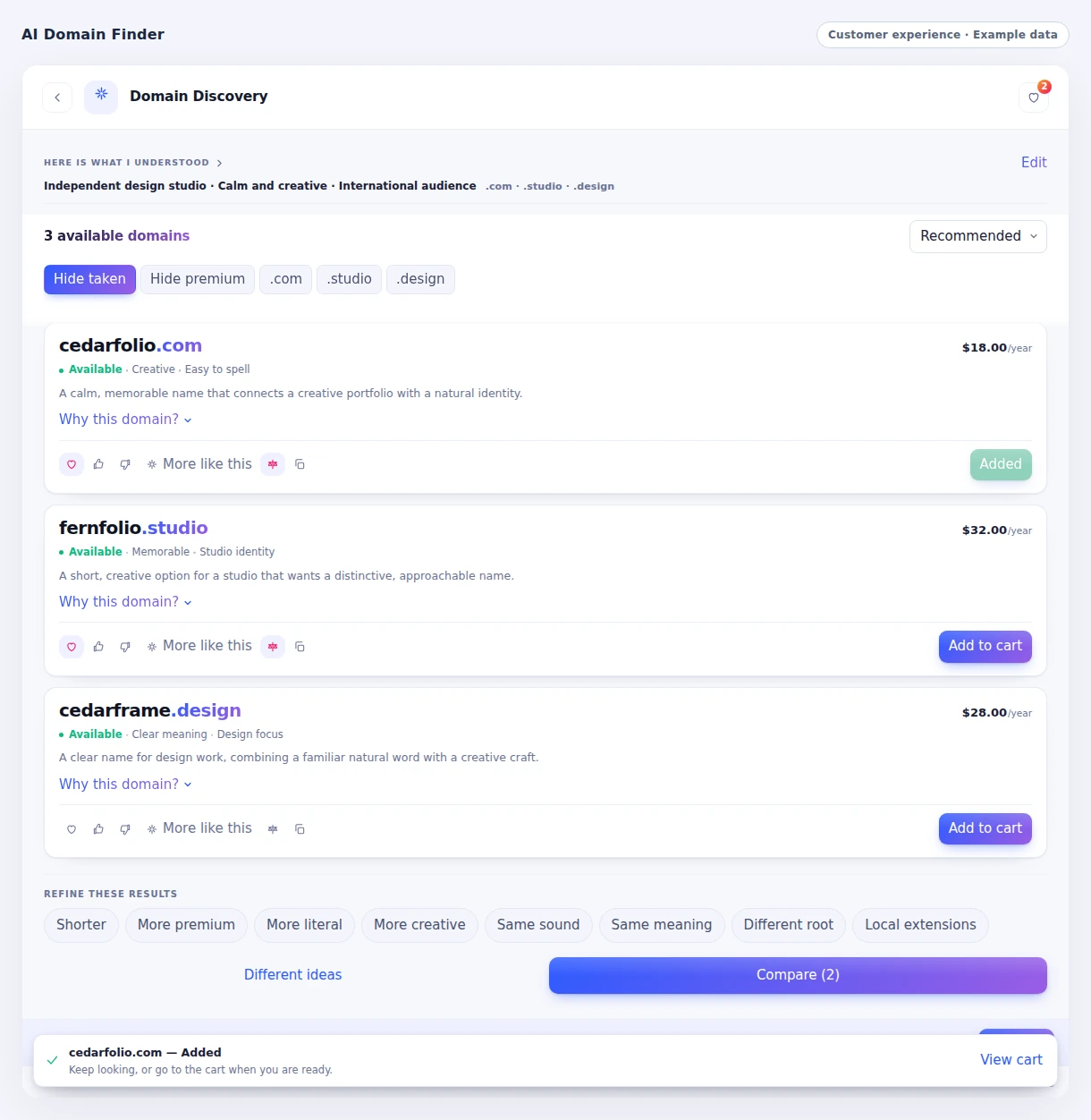 Keep the move to the cart clear
Make the finder part of your website
Choose a launcher that stays available as customers browse, or place the finder directly inside a page. Control its position, colors, wording and mobile presentation from the module's settings, then use page rules to decide where it appears.
The same centrally managed experience can be embedded on approved websites and lead shoppers back to WHMCS for the order. Your marketing site and client area can introduce the finder in different places while drawing on the same configuration. The result is a domain-search experience that fits the page and device where your customer begins.
- Inline or launcher
- Brand and wording
- Desktop and mobile
- Approved websites

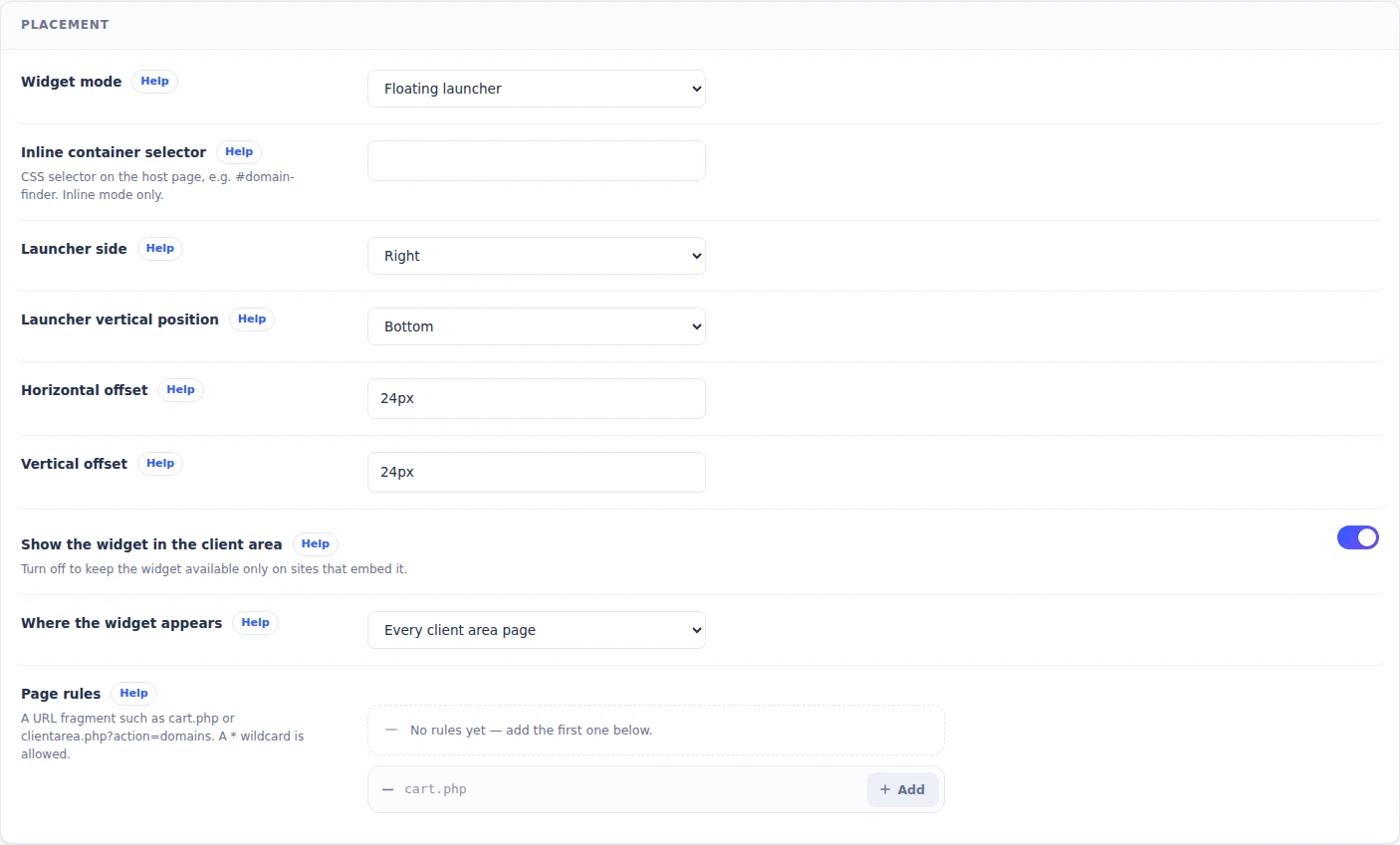 Choose where customers discover the finder
Understand searches and the experience behind them
See how people use the finder: the searches they make, the names they engage with, the extensions they explore and the selections they add to the cart. Customer-journey views focus on deliberate finder use, with passive website loading kept outside that definition.
Provider performance and usage views add the operating context behind those searches, including response times, fallbacks and consumption. Your team can relate customer engagement to the naming and provider settings it controls. This gives administrators a practical place to decide which parts of the finder to refine as they learn how customers use it.
- Customer engagement
- Extension interest
- Provider performance
- Refine the experience
Give saved names a second chance
A saved domain can be useful even when the customer is not ready to order immediately. Configured reminders can revisit eligible signed-in customers after the chosen delay, check whether their saved names are still available and send the selected WHMCS email template.
Choose the reminder delay, limits and email template around the way you want to follow up. Unsubscribe handling gives customers control of further messages, while administrators can review reminder history and the related WHMCS email record. Saved choices become a useful opportunity to continue the conversation when the customer is ready to return.
- Saved selection
- Chosen reminder time
- Availability recheck
- Customer follow-up
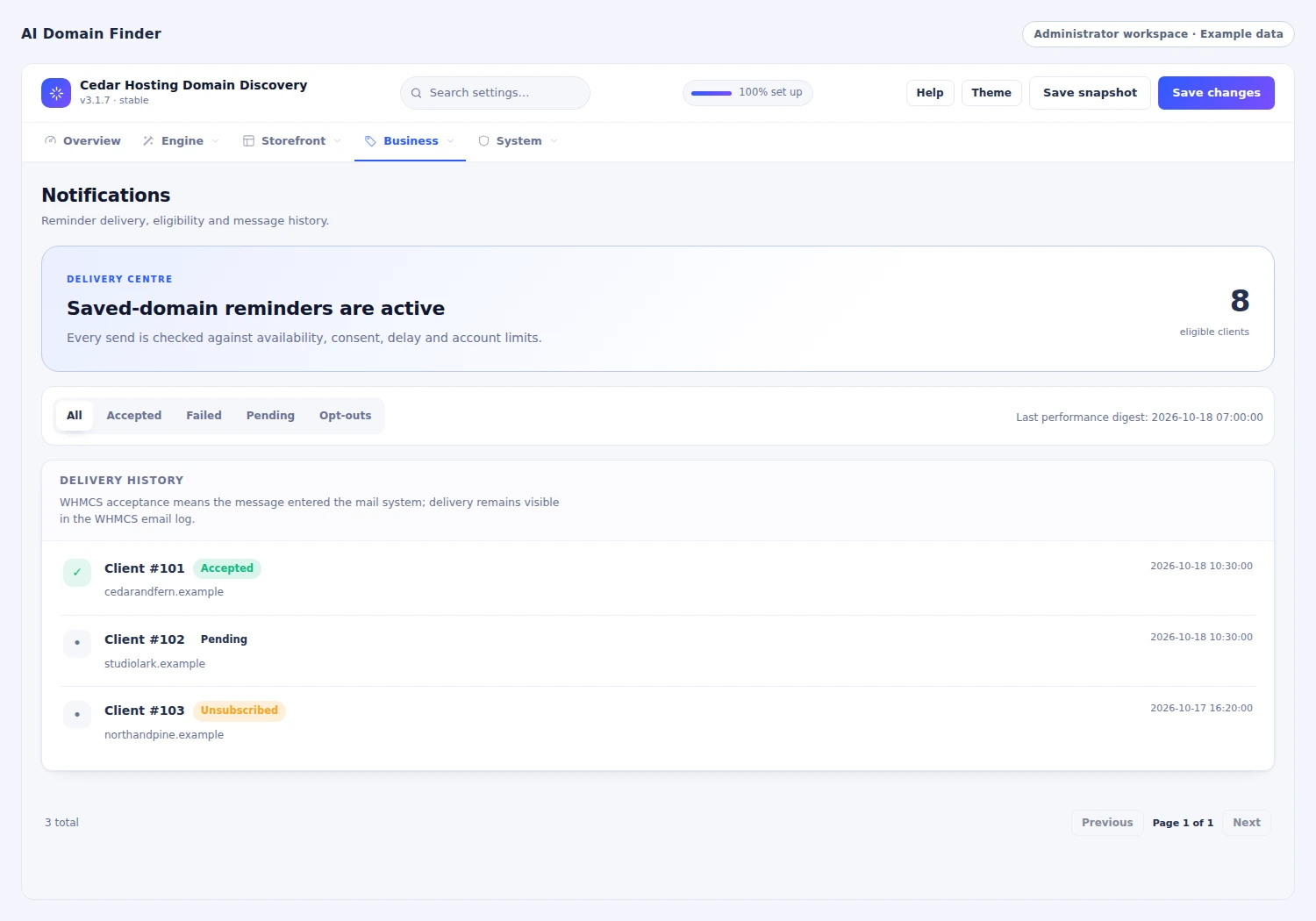
 Define when saved-domain reminders should run
Match the name to the market it needs to reach
The extension is part of the customer's choice. AI Domain Finder combines the customer's brief with an editable extension catalogue covering meaning, industry, market, priority and price band. A local business, a creative studio and a software brand can therefore explore a different mix of suitable extensions from the ones you sell through WHMCS.
Explicit customer extension choices take precedence, while target markets and optional location hints help rank relevant country extensions. Budget and premium naming modes can use the configured price bands as ranking signals. Administrators can tune extension priorities, permitted name characteristics and the balance of local results, giving the finder a commercial direction that reflects your catalogue and the customers you serve.
- Editable extension meaning, industry, market and priority
- Recommendations aligned with your WHMCS TLD catalogue
- Customer choices plus optional local-market relevance
- Price-band signals and control of extension diversity
Shape the AI experience around your business
Choose how the finder uses your configured AI services. Routing profiles and a custom provider order let you set the sequence for generation, with search-time limits, provider timeouts and output-token controls. If one provider cannot return useful candidates, the router can try the next configured option within the search budget.
Built-in name generation remains part of the search and supplies candidates when the AI pass returns none. Names still continue through the finder’s availability and result-selection flow. The provider dashboard brings configuration, response times, errors, requests, token usage, recorded spend and fallback activity together, so the team can review the operating experience as well as the customer journey and adjust the setup with useful evidence.
- Routing profiles and a configurable provider sequence
- Search-time, provider-timeout and output-token settings
- Built-in candidates alongside configured AI generation
- Provider health, usage, recorded spend and fallback views
A closer look at what’s included.
Explore the tools inside AI Domain Finder, grouped around the work they help you do.
Naming direction
- Smart, brandable, short and descriptive styles
- Local, professional, startup and creative modes
- Required and excluded words
- Length, content and diversity controls
- Relevant TLD and country-extension ranking
Generation and availability
- Built-in lexical generation
- Optional configured AI providers
- Provider routing and fallback
- Registrar and WHMCS lookup sources
- Configurable caching and fresh confirmation
Customer selection
- Likes and not-for-me feedback
- More-like-this and brief refinement
- Saved names and comparison
- Filters, sorting and copying
- Registration price and WHMCS cart handoff
Presentation
- Launcher and inline modes
- Page rules and positioning
- Branding, wording and greetings
- Mobile presentation controls
- Approved external website embeds
Administration and growth
- Search and engagement reporting
- Provider performance and usage views
- Order journey attribution
- Saved-name reminders with unsubscribe
- Configuration presets and scheduled digests
From the first action
to a useful outcome.
Follow the tasks inside AI Domain Finder. See which tools come into play and what the finished workflow delivers.
Turn a business idea into candidates
Help the visitor explain and develop the kind of name they want.
Explore the interface- Describe the business and preferred naming style
- Review varied names and relevant extensions
- Refine the brief or ask for more like a favorite
- Save and compare a focused shortlist
Continue with the chosen domain
Connect naming exploration to a familiar purchase journey.
Explore the interface- Choose the shortlisted names
- Review available lookup and price information
- Run the configured fresh availability confirmation
- Continue with the selections in the WHMCS cart
Refine the search experience
Give administrators useful controls and feedback as customers use the finder.
Explore the interface- Choose widget placement and naming policies
- Connect the selected generation and lookup providers
- Review searches, feedback and extension interest
- Adjust the experience and saved-name follow-up
Make domain discovery part of your website.
Choose the naming styles, lookup sources and optional AI providers, then place the finder where your customers begin their domain search. Shape the appearance and wording around your brand and connect the result to the WHMCS cart.
- Set naming and extension preferences
- Connect lookup and optional AI providers
- Choose widget placement and branding
- Review the shortlist-to-cart experience
Try AI Domain Finder free for 7 days.
Explore the module with the workflows that matter to your business. Try a business brief, refine the results and follow a shortlisted name into the cart. Use the seven-day trial to get familiar with the experience, then continue with an annual licence when you are ready.
- Start your 7-day module trial
- Configure the features you want to explore
- Follow a practical customer or staff workflow
- Continue with the annual licence
See what’s new.
Explore new capabilities, improvements and fixes. Every published release includes its version, date and change details.
Keep up with AI Domain Finder.
Open the changelog to read published release notes and explore the product’s development over time.
AI Domain Finder Answer Studio
Good questions.
Better answers.
Explore what AI Domain Finder can do, how it fits your WHMCS, and the details that matter before you get started.
Tell us what you want to offer your customers. We can help you explore the capabilities and plan your next step.
Contact Nabtech ↗01Does the finder need an AI provider to generate names?
The finder has a built-in naming engine and can also use your configured AI providers. You choose how those sources are used, along with naming styles, length, word rules and diversity. The experience combines candidate generation with the extensions and offers relevant to your catalog.
02How can visitors refine a search?
Visitors can respond to a candidate, reject a direction, ask for more like a promising name and refine their brief. Saved names and comparison keep useful options available while they explore. Session preferences and previously shown results help shape the next set of candidates.
03Where do availability and prices come from?
Availability uses the lookup sources you configure, including supported registrar and WHMCS paths. Registration prices come from the shop’s domain pricing and resolved currency. Fresh-check settings can confirm selected names again when the customer continues toward the cart.
04Can I place it on a marketing website?
Yes. Use a launcher or an inline finder and configure where it appears. Approved external websites can embed the centrally managed experience and send selected domains back to WHMCS for the order. Appearance, wording and mobile behavior remain controlled through the module.
05Can the finder follow up on saved names?
You can configure reminders for eligible signed-in customers. The workflow revisits their saved selection after the chosen delay, checks availability and uses the selected WHMCS email template. Reminder limits, unsubscribe handling and administrator history keep the follow-up organized.
06What can administrators learn from the reports?
Reports show deliberate search activity, names and extensions customers engage with, feedback, saved choices and cart activity. Provider views add usage and response context. Your team can use these observations to refine naming policies, widget presentation and the provider setup.
07Can I try the module before buying?
Yes. Start the seven-day free trial of AI Domain Finder and explore the features through a workflow relevant to your business. The trial page explains the terms and starting steps. The annual licence is available when you decide to continue.
08Where can I see product updates?
The current version is shown on this page, and the Changelog opens the release notes. Each published release explains its new capabilities, improvements and fixes. You can read the notes in the page or open the full release history when you want to follow the product over time.
09Can the finder suit both a short brand name and a descriptive business name?
Yes. Naming styles include short, brandable and descriptive directions, alongside local, professional, startup and creative modes. The customer can begin with the kind of identity they want, while your configured length and diversity controls shape the candidates. This gives different business ideas an appropriate starting point for discovery.
10Can a search keep an important word and avoid unwanted terms?
Required and excluded word controls help shape the naming direction alongside length, content and diversity settings. A customer can explore names around an important part of the brief while steering away from unwanted wording. The candidates then continue through the configured extension ranking, availability and result-selection flow.
11Can customers choose the extensions they want to explore?
Yes. Explicit customer extension choices take precedence in the extension-selection process. The finder works with the extensions you sell through WHMCS, so shoppers can focus their naming search on preferred endings while continuing to use the same shortlist, availability and cart journey.
12Can I make extension suggestions more relevant to an industry or local market?
The editable extension catalogue includes meaning, industry, market and priority information. Target markets and optional location hints can help rank relevant country extensions, while administrators tune priorities and the balance of local results. This helps the finder reflect the customers you serve and the extensions in your WHMCS catalogue.
13How do budget and premium naming modes use extension prices?
Configured price bands act as ranking signals for extension suggestions in budget and premium naming modes. They help shape which directions the customer explores. The registration prices shown for a potential purchase still come from your WHMCS domain pricing and the resolved currency, keeping the buying information tied to your shop.
14Can customers add several chosen domains without losing the rest of their cart?
Yes. Customers can select names from their shortlist and continue to WHMCS with other cart items kept in place. Your availability-confirmation settings can recheck the selected names during the handoff. The customer can develop a useful group of domain choices, then review them together in the familiar WHMCS checkout.
15How can a customer work through a large set of naming ideas?
Result filters and sorting help the customer narrow the list, while copying, saved names and comparison keep promising candidates useful. They can organize the choices worth considering before continuing to the cart. This supports a deliberate selection process when the first search produces several appealing directions.
16What happens if one configured AI provider cannot return useful names?
The router can try the next configured provider within the search-time budget. Provider order, timeouts and output-token settings let your team shape that process. Built-in generation supplies candidates when the AI pass returns none, and names continue through the finder's availability and result-selection flow.
17Can I review the AI usage behind the domain-search experience?
Yes. Provider views bring requests, response times, errors, token usage, recorded spend and fallback activity together. Review that operating information alongside customer engagement, then adjust the configured provider order, timeouts and output limits. Your team can assess the search experience with both customer activity and provider consumption in view.
18Can I keep the finder on relevant pages instead of showing it everywhere?
Page rules let you choose where the finder appears. Use an inline placement for a dedicated domain-discovery page or a launcher where ongoing access suits the visit, then set its position and wording. This gives you control over how domain discovery fits into the customer's wider website journey.
19Can I adapt the finder for customers browsing on a phone?
The module includes mobile presentation controls alongside launcher position, colours, wording and greetings. You can shape the finder around the device and page where customers begin, while keeping the naming, shortlist and WHMCS cart journey connected to the same centrally managed experience.
20Do the customer-journey reports distinguish finder use from ordinary page views?
Yes. Customer-journey reporting focuses on deliberate finder activity, with passive website loading kept outside that definition. Searches, engagement with names and extensions, and cart selections help your team understand how people actually use domain discovery. That context makes it easier to review the naming and presentation settings you control.
No questions match that search. Try a different word or explore all topics.
See the difference.Try it in your WHMCS.
Give AI Domain Finder a place in your WHMCS. Start a seven-day free trial and explore the capabilities that matter to your business before buying.