Your DNS service.Ready for every customer you choose.
Turn selected hosting plans, addons and domain registrations into a complete DNS service. Bring provider connections, record templates, customer tools, forwarding, DNSSEC, backups and hosting transitions into one WHMCS module.
Look closer. See what you can do.
Look inside the product, explore its capabilities and see how the work comes together.
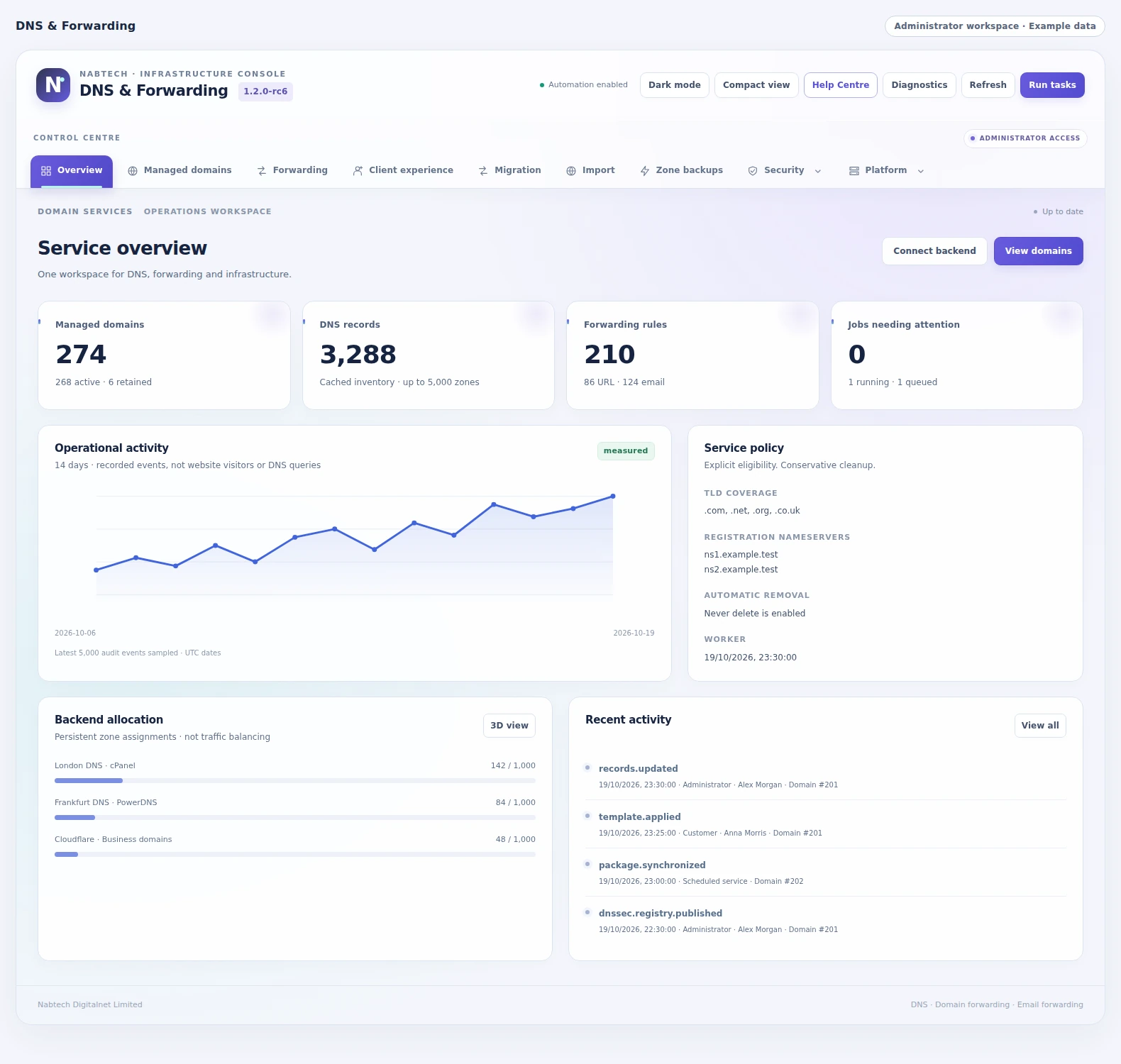
See the DNS service at a glance
Review managed domains, record inventory, forwarding rules, recent operations and the allocation of zones across connected backends.
Explore this capabilityEverything behind a DNS service customers can manage.
Define the offer, prepare the zone and keep the service useful as it changes. DNS & Forwarding connects your hosting products and infrastructure to a practical customer workspace with templates, record tools, history and the security options you choose.
Choose who receives DNS
Link eligibility, allowances and activation timing to selected products, addons, domains or TLDs.
Place and prepare the zone
Connect providers, choose package members and apply the initial records.
Give customers useful tools
Offer structured editing, reusable templates, imports, bulk work and scheduled changes.
Extend the domain
Provide web and verified email forwarding, signing options and delegated reverse DNS.
Keep a recovery path
Use snapshots, restoration, server-copy status and hosting handoff workflows.
Operate the service
Follow approvals, inventory, publication checks, notifications and queued work.
Include DNS with the purchases that deserve it
Build DNS into the products your customers already buy. Select hosting plans, purchased services, addons, registered domains or domain extensions, then decide when the service becomes available. Give each rule its own domain allowance, placement and initial records. Customers with qualifying purchases can use the DNS workspace, including approved domains registered elsewhere when you allow them. Your team can preview eligibility before enrollment and choose what happens when a qualifying service ends. The result is a DNS offer connected to your product strategy, with clear rules for who receives it and how it operates.
- selected WHMCS items
- signup/payment/activation timing
- allowances
- primary/custom-field/customer domain sources
- external-domain verification
- grace and end-access rules.,
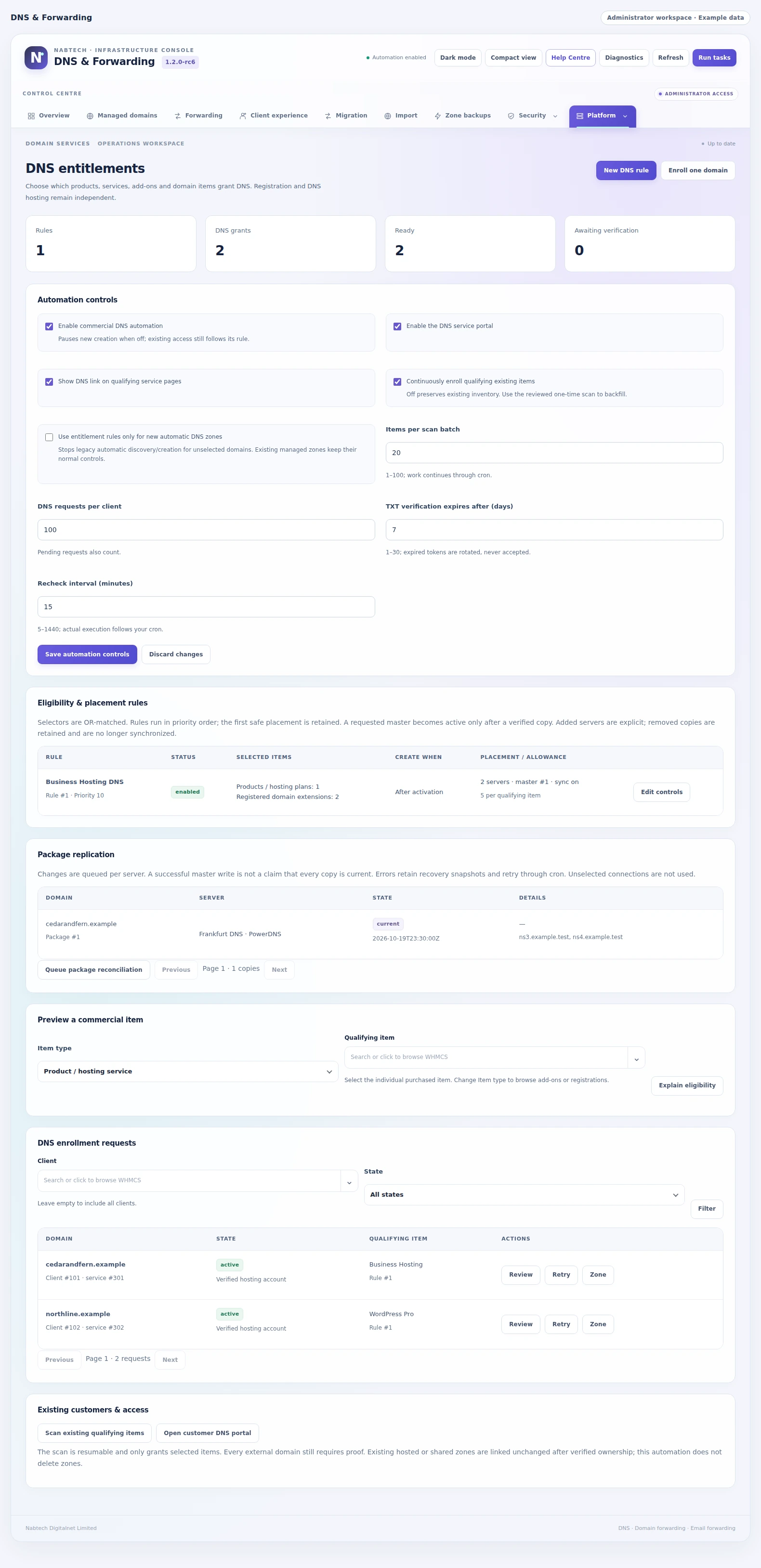 Include DNS with selected purchases
A complete record setup in a reusable template
Stop rebuilding the same DNS configuration for every customer. Create a template containing the records a website, email service or application needs, then make it available to the products and domains that should use it. Values can come from the customer's domain, the hosting service, a fixed setting or a selected WHMCS custom field. Customers can supply the details that only they know and review the resulting changes. Automatic application uses the same ownership and provider checks as ordinary record editing, while template history helps your team follow each deployment.
- multi-record templates
- product/service/addon/TLD audiences
- fixed and WHMCS-derived variables
- customer fields
- automatic application
- conflict handling and application history

 Build a complete DNS setup in Template Studio
Choose the providers. Keep one service experience.
Build around the DNS infrastructure that fits your business. Connect cPanel/WHM, Cloudflare or one of the included native DNS platforms, then place eligible domains on the servers you choose. A package can contain several connections with a selected master and synchronized copies. Provider capabilities, nameservers and current operation status remain visible, so your team can understand the relationship between the managed records and the service answering for the domain. Customers keep a consistent workspace while you retain control over provider selection, capacity, placement and the features each connection exposes.
- 15 platform profiles
- connection tests
- capability verification
- package members/master
- provider pools
- per-target synchronization
Give customers tools they can use
Give customers a focused place to manage their DNS without sending them through an infrastructure console. They can work with structured record fields, select an available template, review bulk changes, export records and return to their change history. Enable the options appropriate to each service and keep limits consistent with your provider configuration. For planned work, permitted customers can schedule a reviewed change for a later service cycle. Nameserver information, protected records and useful status messages keep the next step clear, while your team retains control of the capabilities exposed to each account.
- native portal and record workspace
- previews
- bulk edits and TTL
- presets
- import/export
- history

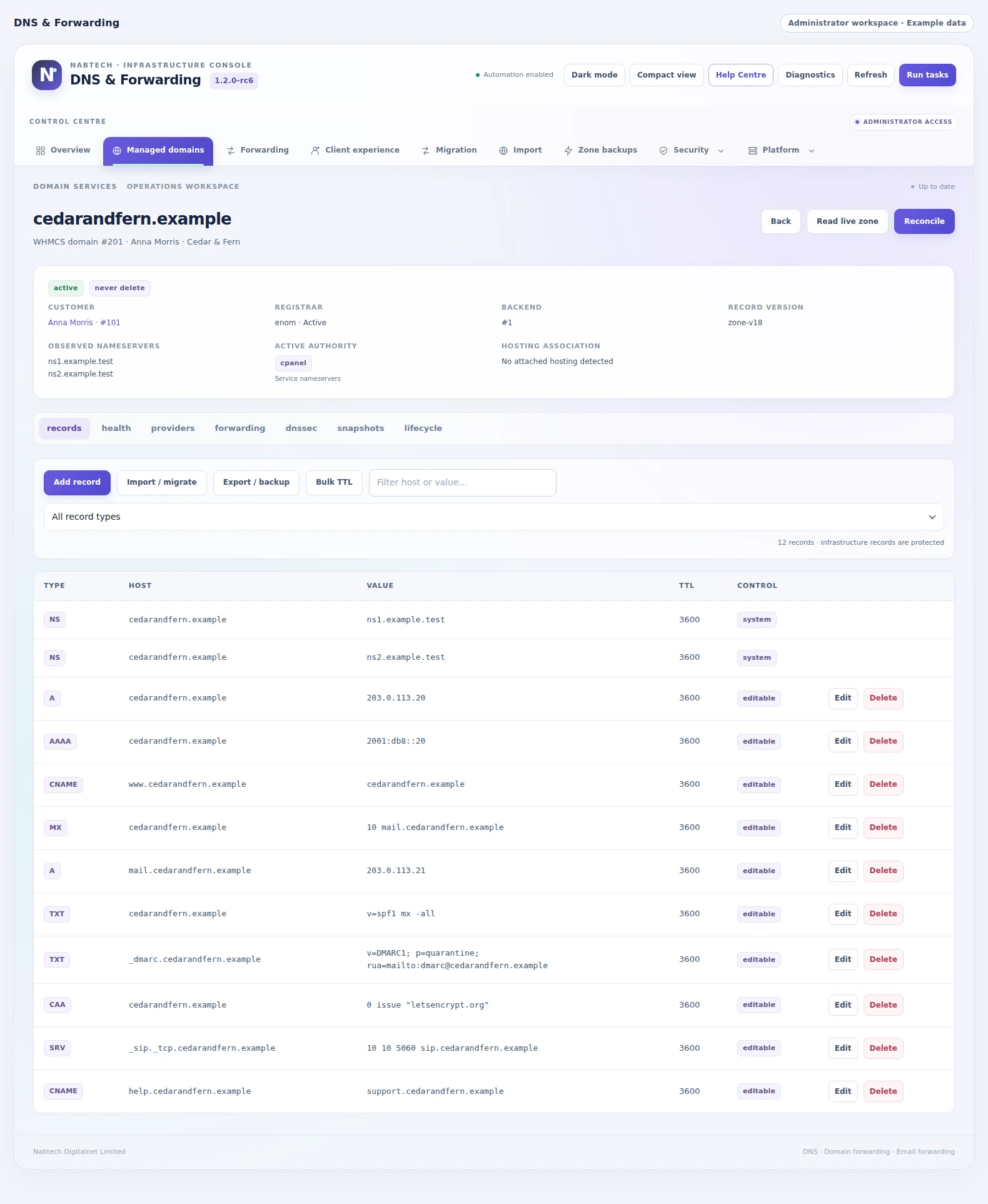 Work with the domain’s live record set
Security and reverse DNS with the right controls
Offer more than basic address records. Where your provider and registrar support the required operations, customers can view DNSSEC information and request the signing or DS changes available to their service. Your team can require approval before those requests run. Reverse DNS has its own workflow for delegated blocks and assigned IP addresses, with PTR targets checked against the relevant policy. This gives technically capable customers useful self-service while keeping infrastructure authority, account ownership and approval decisions connected to the operation being performed.
- DNSSEC status/signing/DS controls
- approval inbox
- reverse block registration and verification
- IPv4/IPv6 PTR
- assigned-IP checks
- optional forward matching.,,

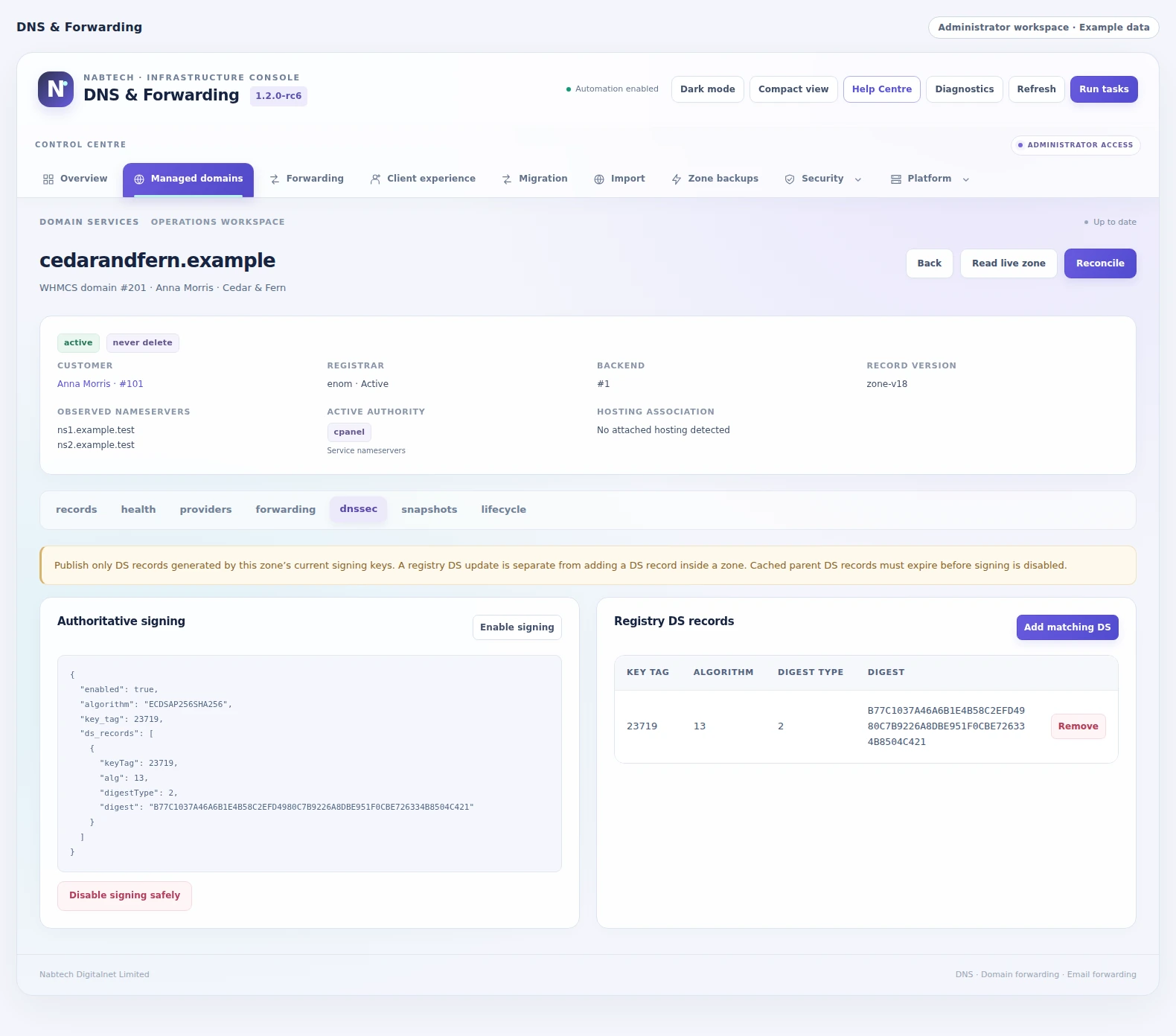 Review zone signing and registry DS records
Make a domain useful beyond its DNS records
Let customers point a domain to the website they want visitors to reach and forward domain-based email to an inbox they already use. Configure the forwarding gateway once, then manage the permitted rules through the DNS service. Web forwarding supports permanent or temporary redirects and control over preserved paths and query strings. Email destinations can be verified before their routes become active. The module checks for conflicting web and mail records and keeps the forwarding configuration connected to the DNS records required to serve it.
- URL redirects
- 301/302/307/308
- path/query preservation
- optional framed mode
- one mailbox destination per alias
- verification links
Move, review and recover your record sets
Bring an existing DNS configuration into the service with a review before it changes the live zone. Import records as an addition or choose an explicit replacement when a full migration is intended. Export a portable record set when you need a copy outside the workspace. Snapshots preserve earlier configurations, and restoration returns through the same current-state checks as an ordinary DNS update. Combined with structured bulk changes and template application, these tools make planned migrations and everyday corrections easier for customers and support staff to understand.
- BIND/JSON import/export
- preview
- append/replace
- protected record preservation
- snapshots
- client backup limits

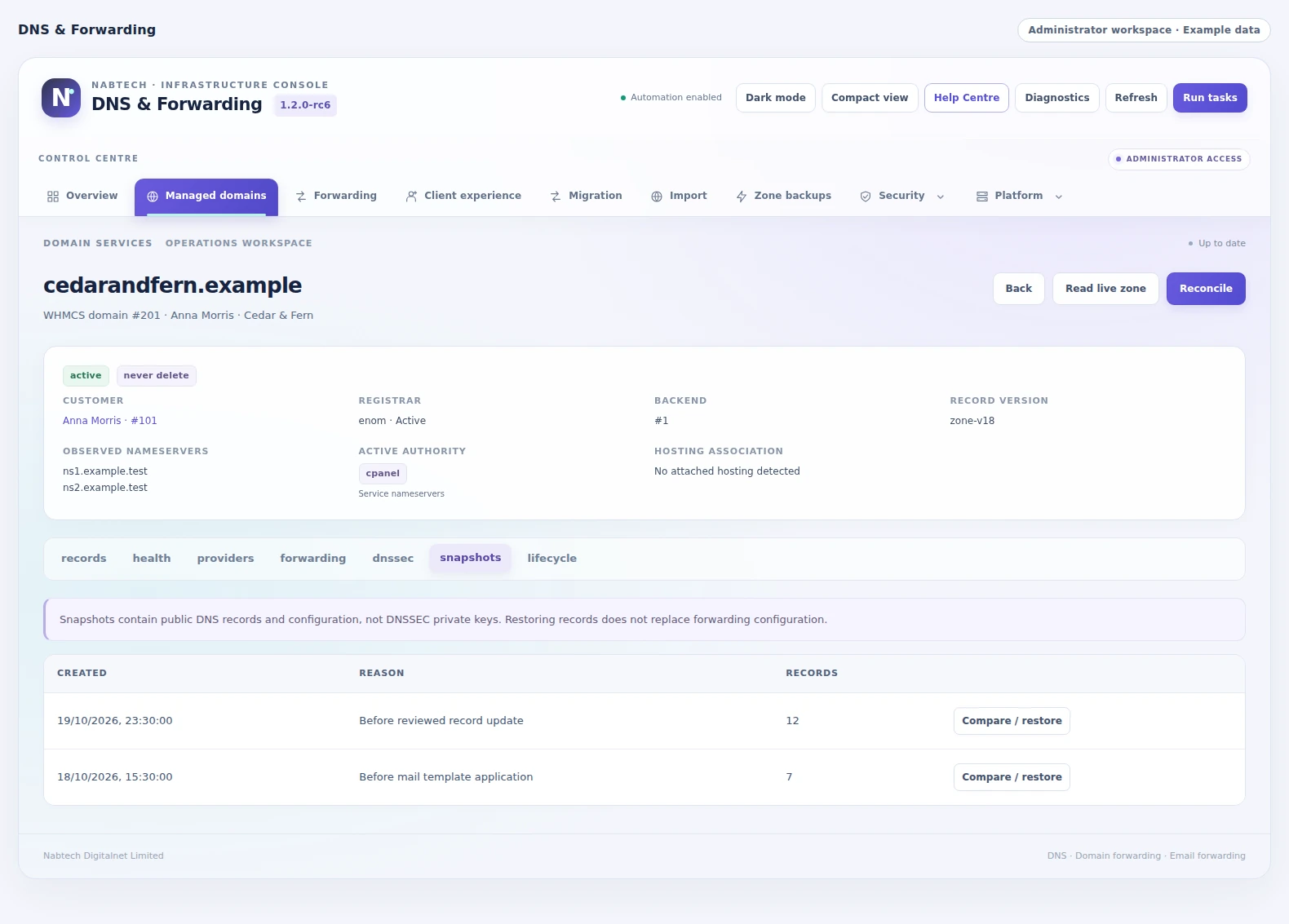 Compare a previous version of this domain
Keep DNS connected as hosting changes
A customer may begin with a domain and add hosting later. Another may end a hosting service while keeping the domain and its DNS. The cPanel hosting handoff workflow coordinates these transitions with the existing DNS-only zone. It preserves the record state, checks the exact hosting service and server, and applies the configured merge after the hosting operation. Recovery information remains available if the provider does not confirm the expected result. Your team can support the customer's next step without treating hosting provisioning and DNS continuity as unrelated jobs.
- pre-create snapshot and conflict handling
- intelligent record merge
- creation success/failure recovery
- pre-termination capture
- eligible reverse handoff

 Follow a DNS-only domain into hosting
See the record issues that need attention
Give support a useful starting point when a DNS setup needs investigation. Run an inspection of the live managed zone to find duplicate records, conflicting or looping CNAMEs, inconsistent TTL values and common MX, SPF or DMARC configuration problems. Findings are grouped by severity and name, so the team can move from a broad customer report to the record set that deserves review.
Nameserver and authority information adds the context around those records. View the observed delegation and the module's publication checks against the configured authoritative servers, alongside provider and synchronization status. This helps staff understand the relationship between a stored zone, its serving nameservers and a recent service change when handling migrations or customer questions.
- Live managed-zone inspection with severity labels
- CNAME, MX, SPF, DMARC, duplicate and TTL checks
- Observed nameservers and authority context
- Publication checks for configured authoritative servers
Give each customer the DNS tools their service needs
A fully managed customer and a technical customer may need different levels of control. Start with a global customer policy, then tailor the available tools for an account or an individual domain. Choose record types, TTL ranges, record and bulk limits, imports, exports, restoration, backups and scheduling to match the service you provide.
Staff can load a managed domain and review its combined permissions before changing an override. Inherited values keep the common policy consistent, while explicit allowances and restrictions cover individual arrangements. Provider capabilities and the global service switches remain part of the effective policy, and DNSSEC or reverse-DNS requests can follow your approval settings. Your team can offer useful self-service with a clear, maintainable boundary for each customer.
- Global defaults with customer and domain overrides
- Per-feature access and provider record-type controls
- Record, TTL, bulk, backup and scheduling limits
- Effective-policy review and configurable request approvals
A closer look at what’s included.
Explore the tools inside DNS & Forwarding, grouped around the work they help you do.
Eligibility and enrollment
- Selected hosting products and purchased services
- Addon, domain and TLD qualification
- Activation, payment and signup timing
- Domain allowances and custom-field values
- External-domain request and ownership proof
Provider operations
- Fifteen named DNS platform profiles
- Provider-specific connection forms
- Connection, capability and provisioning checks
- Existing-zone discovery and inventory onboarding
- Master/member placement and synchronization
Customer record tools
- Structured record editing and validation
- Change previews and bulk TTL work
- Scheduled application and cancellation
- BIND/JSON import and export
- Snapshot history and restoration
DNS Template Studio
- Reusable multi-record templates
- Product and audience targeting
- Fixed and WHMCS-derived values
- Customer-supplied template fields
- Automatic application and run history
Service extensions
- HTTP redirects and path/query options
- Verified email-forwarding destinations
- Available DNSSEC signing and DS workflow
- Delegated IPv4/IPv6 reverse DNS
- Optional approval for selected customer requests
Continuity and operations
- cPanel hosting and reverse handoff
- Lifecycle delays, retention and holds
- Publication and record-health checks
- Feature limits and client/domain overrides
- Queues, notifications and searchable Help Center
From the first action
to a useful outcome.
Follow the tasks inside DNS & Forwarding. See which tools come into play and what the finished workflow delivers.
Include DNS with a hosting plan
Make DNS part of the hosting offer with clear service rules.
Explore the interface- Connect the intended DNS provider
- Select the qualifying product and activation timing
- Set the allowance, placement and initial records
- Preview eligibility and open the customer DNS experience
Apply a reusable record template
Prepare a useful application or email setup without rebuilding the same record set for each customer.
Explore the interface- Open the customer’s managed zone
- Choose an available template and supply its required values
- Review the proposed record changes
- Apply now or schedule the update and follow history
Add a domain registered elsewhere
Let qualifying customers bring an external domain into the service you offer.
Explore the interface- Select an eligible purchased service
- Enter the permitted domain and publish the ownership proof
- Request verification and follow provisioning
- Use the DNS workspace and its nameserver guidance
Define the service before the first zone.
Connect the providers, choose the purchases that qualify and decide how zones should be prepared. Then set customer feature policies, forwarding infrastructure and the operational schedules your team will use.
- Connect and check the selected DNS providers
- Create eligibility rules and package placement
- Prepare record templates and customer permissions
- Configure forwarding, maintenance and notifications
Try DNS & Forwarding free for 7 days.
Explore the module with the workflows that matter to your business. Build an eligibility rule, explore a reusable template and review a customer DNS change. Use the seven-day trial to get familiar with the experience, then continue with an annual licence when you are ready.
- Start your 7-day module trial
- Configure the features you want to explore
- Follow a practical customer or staff workflow
- Continue with the annual licence
See what’s new.
Explore new capabilities, improvements and fixes. Every published release includes its version, date and change details.
Keep up with DNS & Forwarding.
Open the changelog to read published release notes and explore the product’s development over time.
DNS & Forwarding Answer Studio
Good questions.
Better answers.
Explore what DNS & Forwarding can do, how it fits your WHMCS, and the details that matter before you get started.
Tell us what you want to offer your customers. We can help you explore the capabilities and plan your next step.
Contact Nabtech ↗01How do I decide which customers receive DNS?
Create eligibility rules around selected WHMCS products, purchased services, addons, domains or TLDs. Each rule can define when access begins, the number of domains allowed, where zones are placed and which records start the service. An eligibility preview helps you see how the rule applies.
02Can customers use externally registered domains?
Yes, when the selected offer permits them. The customer requests the domain through an eligible purchase, publishes the ownership challenge and follows verification. The workspace provides the DNS tools and nameserver guidance for the resulting service.
03What can a DNS template contain?
A template holds a reusable record set for an application, website or mail service. Values can come from the domain, hosting service, server, selected custom fields or customer input. You choose its audience and application behavior, and the resulting changes pass through review and history.
04Which providers are available?
The platform profiles include cPanel/WHM, Cloudflare, BIND 9, PowerDNS, Plesk DNS, Route 53, Google Cloud DNS, Azure DNS, DigitalOcean, ClouDNS, Akamai/Linode, Vultr, Hetzner, NS1 and DNS Made Easy. The customer tools follow the capabilities of the selected connection and package.
05Can customers schedule or recover a change?
Yes. When enabled in the customer policy, a reviewed change can be prepared for a future service cycle and cancelled before execution. Snapshots preserve earlier record sets, and the restore workflow lets the customer review a previous configuration against the current zone before applying it.
06How does the module handle hosting changes?
The cPanel hosting handoff coordinates a DNS-only zone with hosting account creation and termination. It preserves record state, uses the configured merge behavior and keeps transition results available for staff. Lifecycle settings also define retention, holds and cleanup as services change.
07Can I try the module before buying?
Yes. Start the seven-day free trial of DNS & Forwarding and explore the features through a workflow relevant to your business. The trial page explains the terms and starting steps. The annual licence is available when you decide to continue.
08Where can I see product updates?
The current version is shown on this page, and the Changelog opens the release notes. Each published release explains its new capabilities, improvements and fixes. You can read the notes in the page or open the full release history when you want to follow the product over time.
09Can a web redirect preserve the visitor's path and query string?
Yes. With the forwarding gateway configured, web-forwarding rules can use permanent or temporary redirects and control whether the path and query string are preserved. Supported status choices include 301, 302, 307 and 308. The module checks conflicting web records and keeps the redirect connected to the DNS records needed to serve it.
10How does a customer activate an email-forwarding destination?
The customer configures a domain-based alias and its receiving mailbox, with one destination per alias. Destination verification can be required before the route becomes active. The service checks for conflicting mail records and connects the forwarding rule to the required DNS setup, using the forwarding infrastructure and permissions you configure.
11Can customers review several record changes together?
Yes. The customer workspace supports structured bulk changes and TTL work with a preview of the proposed record set. Protected records, service limits and available provider capabilities remain part of the operation. Staff can enable the appropriate tools through the customer policy, giving permitted users a clearer way to prepare a coordinated DNS update.
12Can we import an existing zone without replacing every record?
Yes. BIND and JSON imports can be reviewed as additions to the current records. When a full migration is intended, the import workflow also provides an explicit replacement option. Preview the differences before applying the record set, with protected-record preservation and the customer's effective policy remaining part of the process.
13Can customers keep a portable copy of their DNS records?
Yes, when exports are enabled for their service. The workspace can export BIND or JSON record sets for use outside the module. Snapshots and restoration provide a separate recovery workflow within the service, with customer backup limits and permissions set by your policy. Customers can therefore keep a portable record copy as well as use the recovery tools you offer.
14Can I offer DNSSEC controls with staff approval?
Yes, where the selected provider and registrar support the required operations. Customers can view DNSSEC information and request the signing or DS changes available to their service. Your approval settings can require staff review before a request runs. The offered controls follow the service's capabilities and the customer's effective permissions.
15Can customers manage PTR records for their assigned IP addresses?
The reverse-DNS workflow supports delegated IPv4 and IPv6 resources, with block registration and authority verification. Customer requests are checked against the relevant IP allocation and service policy, with optional forward matching and approval settings. This lets you offer PTR management for the address resources your service is entitled to control.
16Can one customer or domain have different DNS permissions?
Yes. Start with global defaults, then apply customer or individual-domain overrides. You can tailor record types, TTL ranges, record and bulk limits, import, export, restoration, backups and scheduling. Staff can review the combined effective policy, while provider capabilities and the global service switches continue to determine which operations are available.
17Which record problems can the DNS health view help investigate?
The inspection checks the live managed zone for duplicate records, conflicting or looping CNAMEs, inconsistent TTL values and common MX, SPF or DMARC configuration problems. Findings are grouped by severity and name. Support staff can use that detail to move from a broad customer report to the record set that needs review.
18Can staff check how a managed zone relates to its serving nameservers?
Yes. Nameserver and authority views show observed delegation and publication checks against the configured authoritative servers. Provider and synchronization status add context about the managed copies. Together, these views help staff investigate a migration or recent change and understand the relationship between stored records and the nameservers serving the domain.
19Can a DNS package use more than one server connection?
Yes. A package can contain multiple connections with a selected management master and synchronized members. Staff control placement, provider pools and the capabilities each connection exposes, then follow synchronization for the individual targets. This supports a consistent customer workspace while keeping the underlying server arrangement visible to your operations team.
20Can we bring existing provider zones into the managed inventory?
Yes. Existing-zone discovery searches connected backends, matches domains and tracks the discovered records. Zones are linked through explicit ownership and resource rules. Inventory onboarding can work progressively through an established WHMCS installation, helping staff bring eligible existing services into view under the provider and service configuration they have chosen.
No questions match that search. Try a different word or explore all topics.
See the difference.Try it in your WHMCS.
Give DNS & Forwarding a place in your WHMCS. Start a seven-day free trial and explore the capabilities that matter to your business before buying.