Connect checkout, renewals and payment operations.
Give customers a clear Paystack payment journey, useful saved-method controls and item-level renewal choices. Give your team the reference, invoice and activity context to follow each payment inside WHMCS. Available free, with NGN payment processing.
Look closer. See what you can do.
Look inside the product, explore its capabilities and see how the work comes together.
Run Paystack from a dedicated operations workspace
See payment attempts, recorded outcomes, unresolved work and saved-card health together in the module’s WHMCS administrator overview.
Explore this capabilityA clearer journey for customers and the billing team.
Paystack Advanced connects customer choices, saved methods, permitted renewal collection and staff follow-through. Each transaction retains its invoice and payment-reference context from checkout through the team’s ongoing payment work.
Customer checkout
Offer saved methods, hosted card entry and the alternative channels available to your setup.
Payment methods
Save eligible reusable card authorizations and let customers choose or remove their default method.
Renewal choices
Keep automatic collection attached to eligible hosting services, addons and domains.
Amounts in context
Show the original invoice and NGN processing relationship throughout the payment attempt.
Payment operations
Search the ledger, inspect a reference, follow activity and add useful case notes.
Your presentation
Set checkout identity, customer wording and payment follow-up messages from WHMCS.
Keep checkout connected to the invoice
Start with the invoice the customer is trying to pay. The checkout presents the payment choices your setup supports, carries the invoice context into Paystack and keeps the customer informed as the attempt progresses. A returning customer can select an eligible saved method; someone paying for the first time can use the hosted card flow or another available channel. When Paystack or the bank needs another step, the journey follows that authorization process and checks the result against the same reference. Payment status stays connected to the invoice throughout.
- Invoice and checkout-complete entry points
- Saved, new-card and available alternative-channel choices
- Paystack-hosted card input
- Reference-based status and completion checks

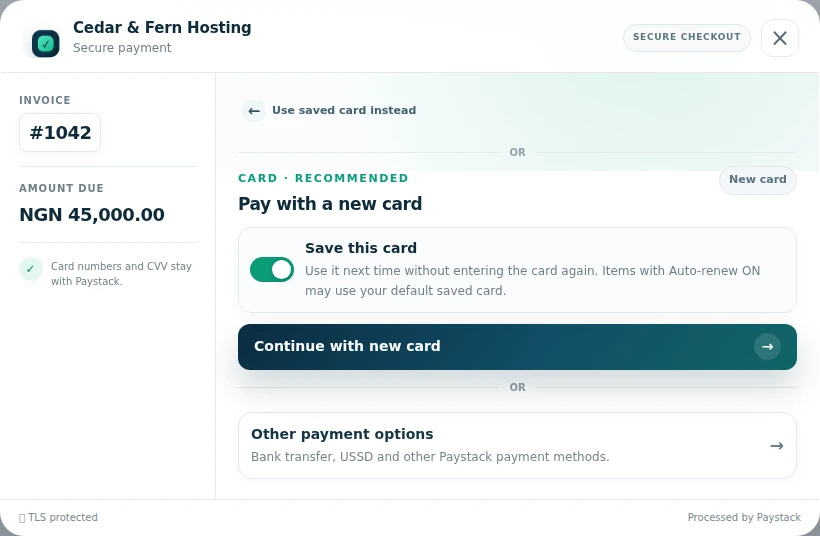 Offer another method from the saved-card view
Give customers control of repeat payments
Make the next payment easier without hiding how the saved method is used. When a successful payment returns an eligible reusable card authorization and saving is enabled, the method can appear in WHMCS payment settings. Customers can review their saved methods, choose a default and remove one they no longer want to use. Renewal choices remain attached to the relevant services, addons and domains. That separation gives the customer a useful payment method and a clear place to decide which eligible items may use it for future automatic collection.
- Saved methods based on verified reusable card authorizations
- Native WHMCS payment-method integration
- Default selection and removal
- Item-level renewal settings alongside the payment method
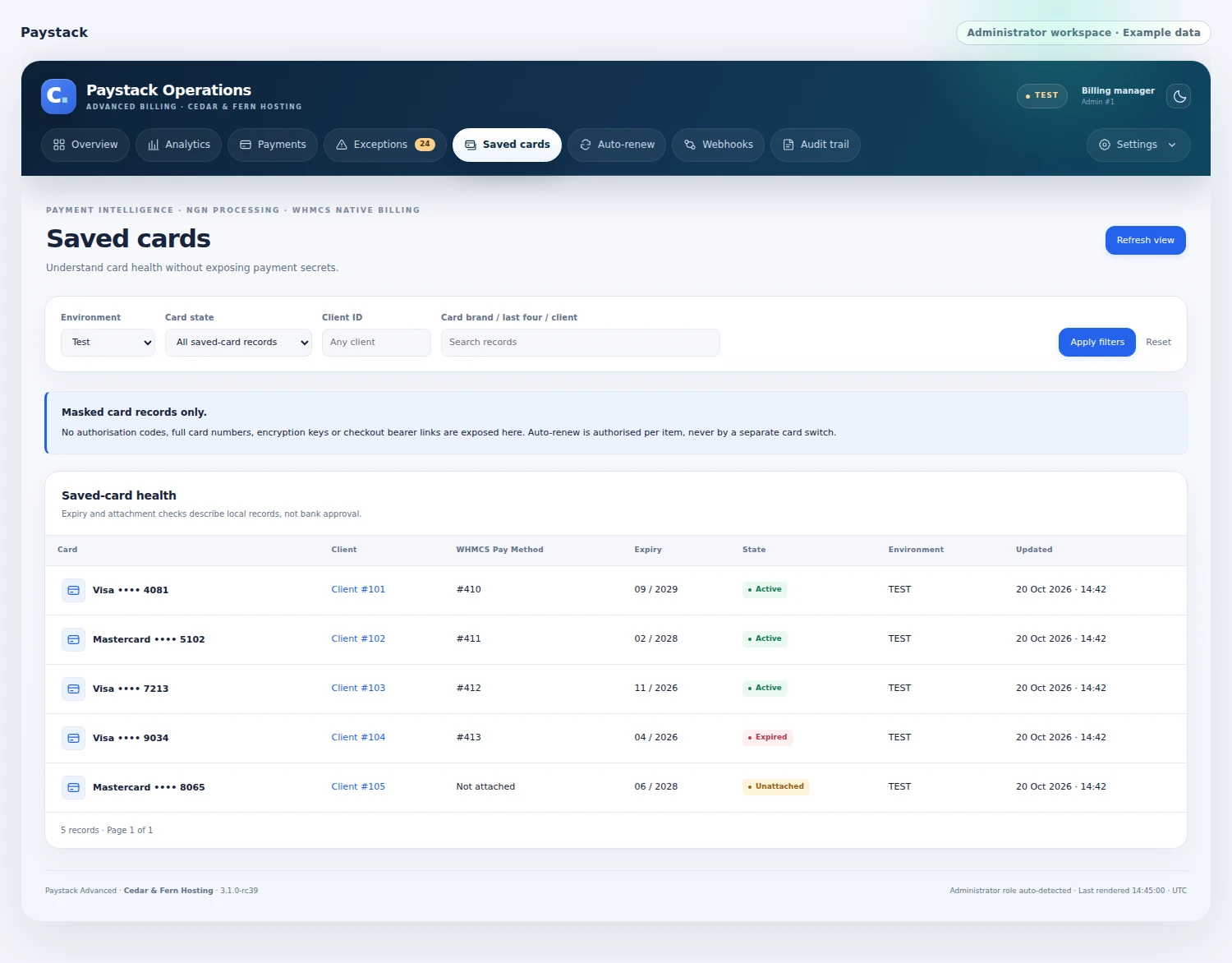
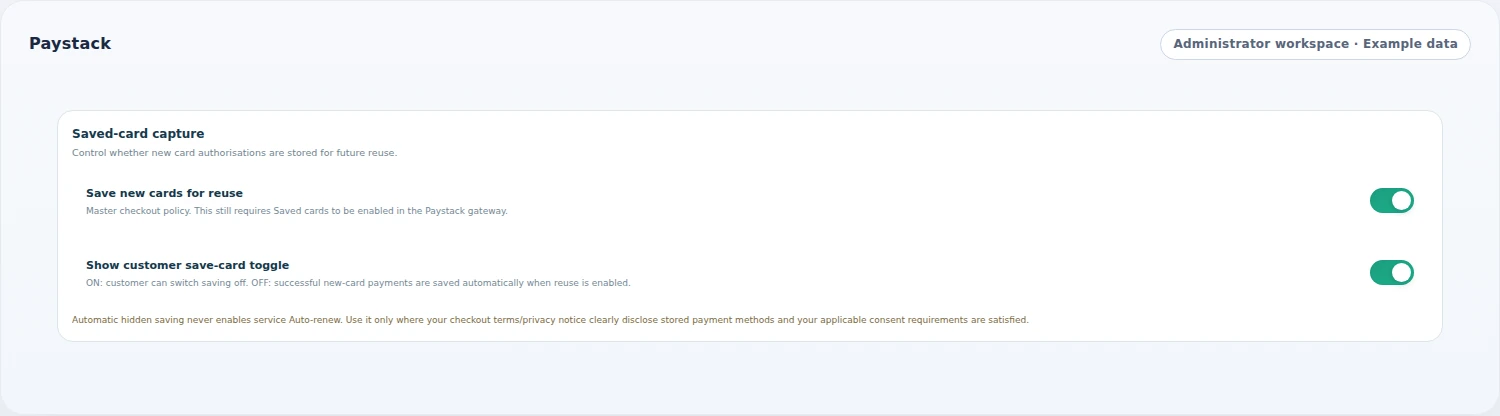 Control how reusable methods are offered
Make renewal choices item by item
Keep automatic payment tied to the item the customer intends to renew. Hosting services, addons and domains have their own eligibility and preference state. The module respects the existing WHMCS domain setting and can read a connected service-renewal authority. Before WHMCS collects an invoice, the gateway checks that its payable recurring items qualify and that the account has a usable saved method. Retry settings and customer messages explain the next step when collection does not complete. Customers can still return to the invoice and pay through the present-customer checkout.
- Separate hosting, addon and domain choices
- Existing domain preference remains authoritative
- Whole-invoice eligibility before capture
- Bounded retries and action emails
Show the amount in context
Help customers understand how their invoice becomes a Paystack payment. Payments are processed in NGN while retaining the invoice's original currency and amount. Where conversion is needed, WHMCS supplies the currency conversion and checkout can show the NGN processing value with an explanation. The payment attempt keeps that amount as it moves through verification, while the billing record retains its invoice context. Your team can review processing volume and original-currency information in the operations views, making the relationship visible to both the person paying and the person reconciling the payment.
- Original invoice and NGN processing context
- WHMCS currency conversion
- Processing amount retained for an in-flight reference
- Currency-aware operations reporting

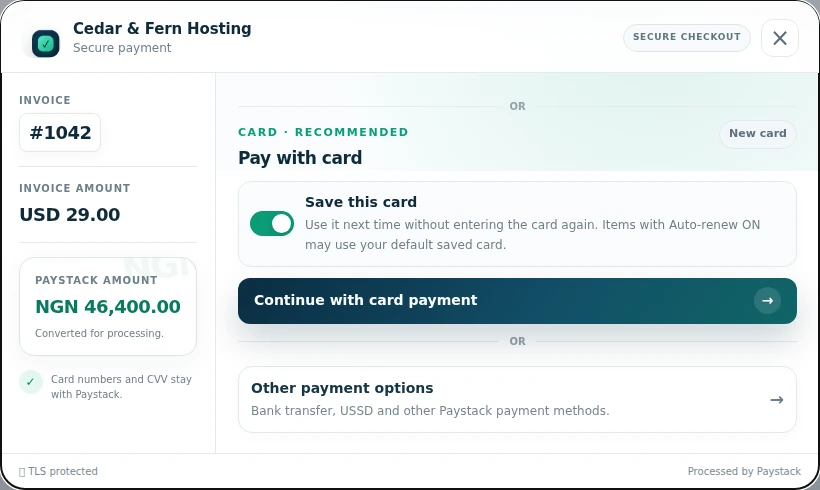 Keep the invoice and processing amount clear
Give billing questions a clear starting point
Open Paystack Operations when a customer asks what happened to a payment. Search by the available payment filters, open the reference and review its invoice, processor and accounting context. Exceptions, webhook records and activity help your team see where attention is needed. An operator can add a case note or check an existing reference again, while the payment engine preserves unresolved states for the appropriate follow-up. The overview and analytics screens then bring those individual transactions together, so daily payment work has a home inside WHMCS.
- Searchable payments and reference detail
- Exceptions, webhook records and audit activity
- Case notes and existing-reference verification
- Overview, analytics and filtered CSV export

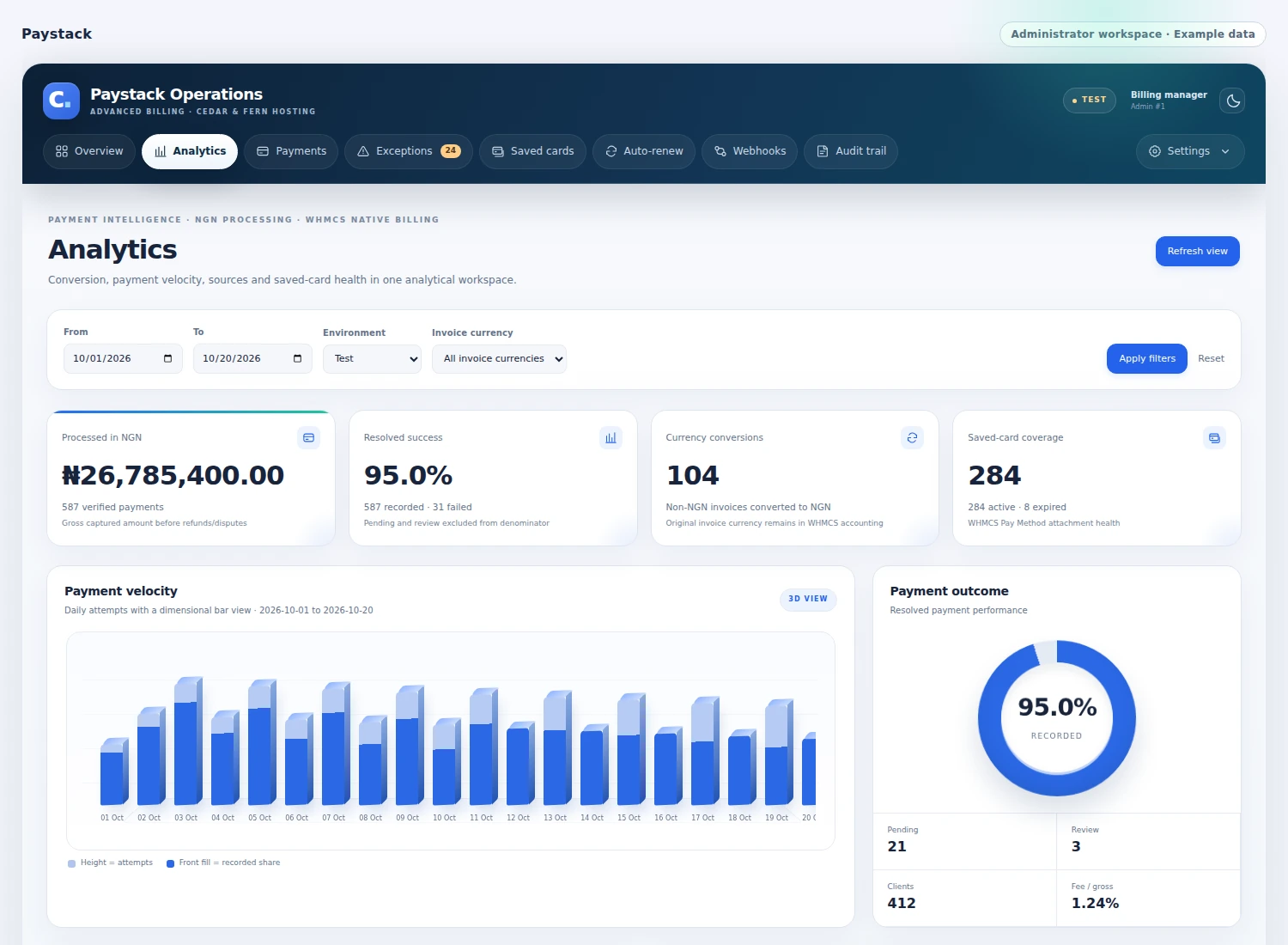 Understand payment activity and outcomes
Make payment messages feel part of your business
Set the checkout identity and customer-facing language from the operations workspace. Brand name, icon, payment labels, status text and overlay settings can be adjusted without editing the checkout code. The customer communication continues through native WHMCS email templates for payment problems, authorization steps and missing methods. Those messages can direct a customer to the invoice or payment settings, while your existing WHMCS email presentation remains in place. Together, the settings help your business explain the payment journey with a consistent voice from the first screen to the follow-up.
- Brand name and uploaded icon
- Editable payment and status copy
- Modal overlay controls
- Native WHMCS action emails with administrator edits preserved
Bring payment setup and service checks together.
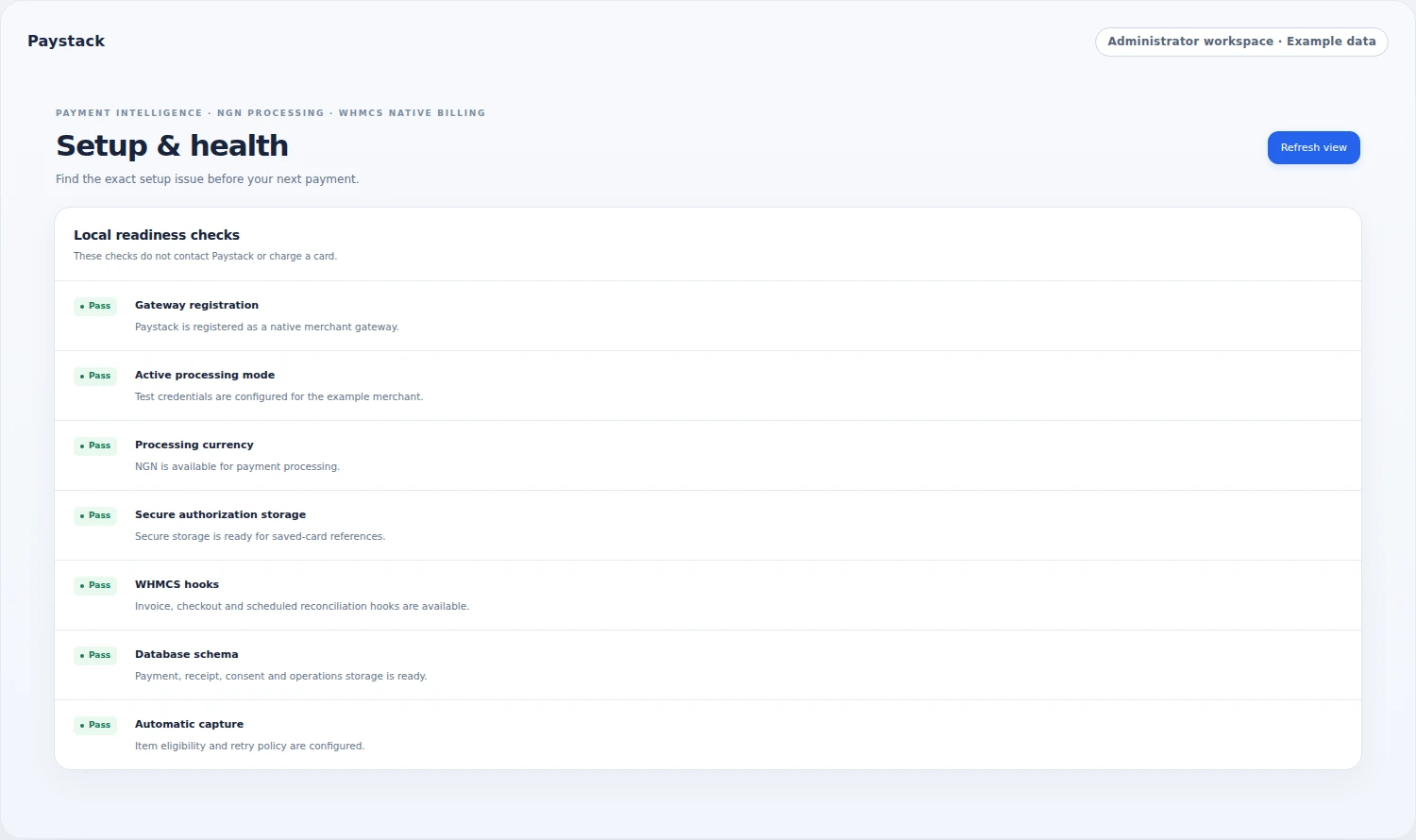
Give your team a practical place to manage the payment setup and its daily operation. The health view brings payment configuration, NGN processing, saved-method setup and scheduled activity into one screen. Staff can also see the state of customer email templates and payment notifications. The workspace identifies the active test or live mode and provides the settings needed to prepare the gateway. After launch, the same area remains useful for understanding the setup, while the payment ledger follows individual transactions and gives your team the context to answer customer questions.
- Test/live credential and live-payment controls
- Gateway and NGN conversion checks
- Storage, hooks, cron and webhook visibility
- Setup and troubleshooting guides
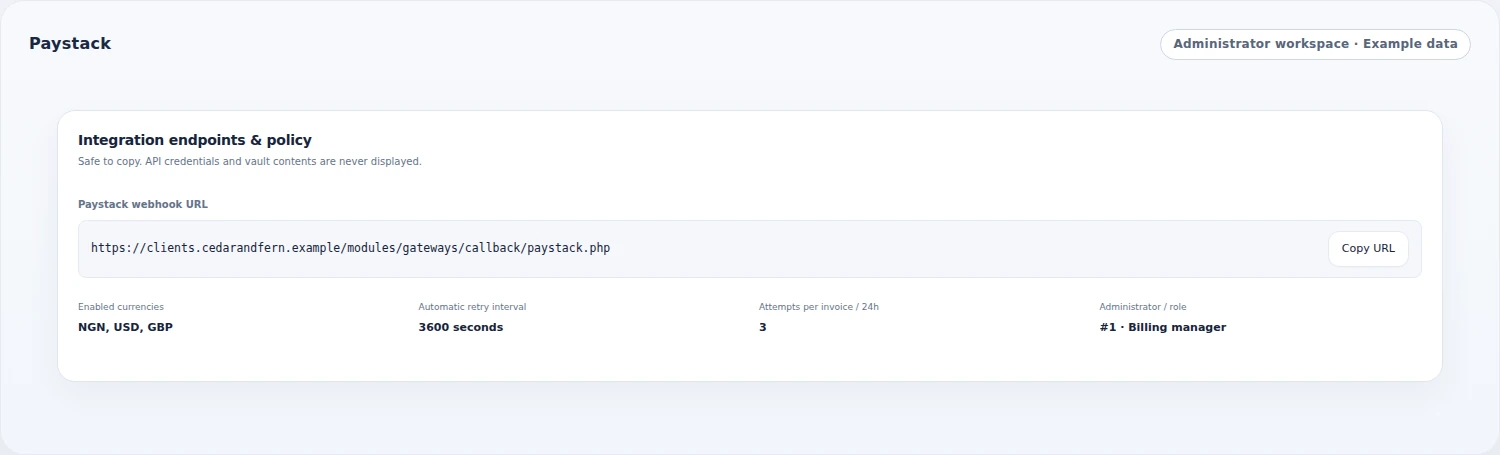 Keep integration and retry settings visible
Follow every payment beyond the checkout window
Keep the payment's identity intact while the customer completes a bank authorization or waits for the result. Paystack Advanced retains the original reference, so browser checks, a signed payment notification, scheduled follow-up and an operator's verification all return to the same attempt. A checkout that closes or takes longer to respond can still be followed through its recorded progress.
Before recording a successful payment against the invoice, the engine checks the processor reference, amount, currency, customer and invoice context. Existing transaction checks keep that accounting connected to the original result. Pending payments and items needing review remain visible to the billing team, giving staff a useful starting point when a customer asks what happened.
- One retained reference across authorization and status checks
- Webhook, scheduled and staff verification of existing attempts
- Amount, currency, customer and invoice checks before accounting
- Distinct pending, review and recorded-payment outcomes
See the patterns behind your payment activity
Give the team a daily view of how the gateway is being used. The analytics workspace brings payment attempts, recorded outcomes, pending work and review counts together for the selected reporting period. Daily charts show the pace of activity, while source comparisons explain where attempts originated. Saved-card coverage and expiry information help staff understand the payment methods available for future collections.
Currency views retain the original invoice denominations alongside the NGN processing totals, making converted payments easier to interpret. Move from the overview to the payment ledger when a pattern needs closer attention, then export the filtered records for your team's follow-up. These are operational views of the gateway's recorded activity, with the transaction detail still close at hand.
- Daily payment activity, outcome charts and unresolved counts
- Payment-source comparisons for the selected reporting period
- Original invoice-currency totals alongside NGN processing amounts
- Saved-card attachment health and filtered payment-ledger CSV exports
A closer look at what’s included.
Explore the tools inside Paystack Advanced, grouped around the work they help you do.
Invoice checkout
- Native WHMCS gateway entry
- Paystack-hosted card input
- Eligible saved-method selection
- Available alternative payment channels
- Provider challenge and status journey
Customer payment controls
- Verified reusable card authorizations
- Native WHMCS payment methods
- Default method choice and removal
- Separate hosting, addon and domain preferences
- Customer confirmation of renewal changes
Collection and messaging
- Whole-invoice recurring-item eligibility
- Scheduled WHMCS capture
- Configured retry limits
- Authorization and missing-method messages
- Editable native WHMCS payment emails
Payment continuity
- Original invoice currency and amount
- NGN processing and WHMCS conversion
- Stable amount for the payment attempt
- Reference-based completion checks
- Notification and reconciliation activity
Team operations
- Searchable payment ledger and detail
- Invoice, processor and accounting context
- Exceptions, events and case notes
- Existing-reference verification
- Filtered analytics and CSV export
Presentation and administration
- Checkout brand, icon and customer copy
- Overlay appearance and status labels
- Test and live payment context
- Setup and service health views
- Separate staff view, operation and export permissions
From the first action
to a useful outcome.
Follow the tasks inside Paystack Advanced. See which tools come into play and what the finished workflow delivers.
Complete an invoice payment
Keep the customer informed while the reference and invoice stay connected.
Explore the interface- Open the invoice and select Paystack
- Choose an eligible saved method or available payment channel
- Complete the hosted authorization steps
- Follow the payment result against the invoice
Prepare the next eligible renewal
Give customers a useful method and clear control over recurring collection.
Explore the interface- Save an eligible reusable method after payment
- Choose the default in payment settings
- Review renewal choices for the relevant services, addons and domains
- Let the scheduled collection follow eligible invoice items
Answer a payment question
Start the conversation with the transaction and its recorded history in view.
Explore the interface- Find the payment using the operations filters
- Open its reference and invoice context
- Review processor, accounting and activity information
- Verify the existing reference or record a case note
Prepare your Paystack payment experience.
Connect your Paystack merchant account, choose the test or live context and review the NGN processing settings. Set the checkout presentation and payment-method policies, then use the gateway and operations views to follow a representative invoice payment.
- Connect the Paystack account and select the payment mode
- Review NGN processing and invoice currency settings
- Set checkout, saved-method and renewal preferences
- Follow an invoice payment and its operations record
Start with Paystack Advanced, free.
Explore the checkout, saved-method controls and payment operations workspace with the free module. Set up your Paystack account connection, review the customer experience and follow the payment work that matters to your team.
- Get Paystack Advanced free
- Connect and configure the gateway
- Explore customer payment and renewal controls
- Use the operations workspace for ongoing payments
See what’s new.
Explore new capabilities, improvements and fixes. Every published release includes its version, date and change details.
Keep up with Paystack Advanced.
Open the changelog to read published release notes and explore the product’s development over time.
Paystack Advanced Answer Studio
Good questions.
Better answers.
Explore what Paystack Advanced can do, how it fits your WHMCS, and the details that matter before you get started.
Tell us what you want to offer your customers. We can help you explore the capabilities and plan your next step.
Contact Nabtech ↗01Is Paystack Advanced free?
Yes. The Paystack Advanced module is available free. It includes the checkout and gateway experience, saved payment methods, item-level renewal controls and the payment operations workspace. Your Paystack merchant account and payment processing follow the terms of your Paystack service.
02How do customers enter their payment details?
Customers use Paystack-hosted card entry or another payment channel available to your setup. Returning customers can choose an eligible saved method. The checkout keeps the invoice context visible, follows any required authorization step and checks the resulting payment against its reference.
03Can customers manage their saved cards?
Eligible reusable card authorizations from successful payments can be stored as native WHMCS payment methods when saving is enabled. Customers can review their methods, select a default and remove a method. Their service, addon and domain renewal preferences remain separately visible.
04How are automatic renewal payments chosen?
Customers manage the eligible hosting services, addons and domains they want to renew automatically. Before scheduled capture, the gateway checks the payable recurring items across the invoice and the available saved method. A customer can also return to the invoice for a present-customer payment.
05Which currency does the payment use?
Paystack Advanced processes payments in NGN. The original WHMCS invoice retains its own currency and amount, with WHMCS conversion used where needed. Checkout can explain the NGN processing value, and the operations views preserve both the payment and invoice context.
06What can staff see in Paystack Operations?
The operations workspace brings together the payment ledger, reference detail, invoice and processor information, activity, exceptions and case notes. Staff can verify an existing reference, review analytics and export filtered information according to their assigned permissions.
07Can I change the checkout branding and messages?
Yes. Set the brand name, icon, payment labels, status wording and overlay appearance from the operations workspace. Native WHMCS email templates cover payment follow-up, authorization steps and missing methods, so the customer communication can follow your business’s wording and presentation.
08How do I follow new versions of the free module?
Use the visible Changelog to read the module’s published releases, including their dates, new capabilities, improvements and fixes. The page shows the current published version and provides the free acquisition destination alongside the product guidance.
09What if a customer closes checkout before seeing the payment result?
An attempt that has already been recorded retains its original payment reference. Browser checks, signed payment notifications, scheduled follow-up and staff verification can return to that same attempt. The billing team can inspect its recorded progress and invoice context to establish the outcome, even when the customer did not see a final checkout message.
10Can staff check a payment without starting another charge?
Yes. Paystack Operations includes verification of an existing payment reference. That check follows the recorded attempt and its processor result, giving staff the invoice, accounting and activity context needed for follow-up. An operator can also add a case note so the next person reviewing the payment can see what has already been investigated.
11What is checked before a payment is recorded against an invoice?
The payment engine checks the processor reference, amount, currency, customer and invoice context before recording a successful result in WHMCS. Existing-transaction checks keep the accounting tied to the original attempt. Payments that are still pending or need review remain distinguishable in the operations workspace for the team's follow-up.
12How can the billing team understand pending or review states?
The operations views distinguish pending attempts, payments requiring review and recorded-payment outcomes. Staff can open the reference to inspect the processor result, invoice context, payment notifications and activity. This gives the team evidence for deciding the next step when a customer asks about an unresolved payment.
13Can I see payment trends for a selected reporting period?
Yes. Analytics bring together payment attempts, recorded outcomes, pending work and review counts for the period you select. Daily charts show activity over time, while payment-source comparisons and currency views add context. Staff can move into the payment ledger when a pattern needs closer investigation.
14Can I export just the payments relevant to a billing review?
Staff with export permission can use the payment ledger's filters and export the resulting records as CSV. This keeps a follow-up list focused on the payment activity being reviewed. The individual references remain available in the operations workspace with their invoice, processor and accounting details.
15Can staff see which saved payment methods need attention?
The analytics workspace includes saved-card coverage, expiry information and attachment-health views. These help the team understand the methods available for future collections and identify records needing attention. Automatic collection still depends on a usable saved method and the eligibility of the payable recurring items on the invoice.
16Can I separate permission to view payments, perform operations and export records?
Yes. The administration tools provide separate staff permissions for viewing payment information, performing supported operations and exporting records. You can assign access around each person's billing responsibilities. That lets the team share the payment context while keeping operational and export access under your chosen staff policy.
17Can I review the gateway in test mode before enabling live payments?
Yes. Setup distinguishes test and live credentials and includes controls for enabling live payment processing. The health view brings the active mode, NGN conversion, saved-method setup and scheduled activity into one place. You can review those settings and follow a representative invoice payment while preparing the gateway for your business.
18Will every available payment channel create a reusable saved method?
A saved method requires a verified reusable card authorization from a successful payment, with saving enabled in your setup. An alternative channel being available at checkout does not itself supply that authorization. Returning customers can use a saved method only when it meets the gateway's eligibility requirements.
19What happens if an invoice includes items that do not qualify for automatic collection?
The gateway checks the payable recurring items across the whole invoice before scheduled capture. Automatic collection proceeds only when that invoice and the saved method meet the eligibility requirements. Customers can still return to the invoice and complete a present-customer payment through the checkout options available to your setup.
20How are customers guided when a scheduled payment cannot complete?
Configured retry limits and native WHMCS action emails support the follow-up. Messages can explain a payment problem, a required authorization step or a missing payment method and direct the customer to the invoice or payment settings. The customer can then take the appropriate action while staff retain the original payment context in Operations.
No questions match that search. Try a different word or explore all topics.
A better payment experience.Free from Nabtech.
Explore the checkout, renewal and operations tools inside Paystack Advanced. Bring the capabilities into your WHMCS for free.